


If you’ve ever experienced the frustration of a sticky key or the deafening clatter of an old keyboard, you know the importance of a reliable, quiet, and comfortable typing device. Our expert team has spent 17 hours researching and reviewing membrane keyboards to bring you a comprehensive guide to the best options on the market.
TL;DR:
- Membrane keyboards offer a quiet and smooth typing experience.
- They are cost-effective and resistant to spills and dust.
- We’ve reviewed five top-rated membrane keyboards from renowned brands.
- You’ll learn the important factors to consider when purchasing a membrane keyboard.
- Also, we provide tips to spot potential issues and tests to assess keyboard quality.
Logitech K120 – Best Budget-friendly Keyboard

The Logitech K120 is a testament to the idea that simplicity and functionality can coexist seamlessly. If you’re seeking a reliable, robust, and comfortable typing experience, this is the keyboard to consider. Its low-profile keys provide a quiet, smooth typing experience, making it an excellent choice for office environments or shared spaces. The sturdy design and spill-resistant build ensure it can endure the rigors of everyday use. Plug-and-play USB connectivity means no additional software is needed to get started. Although it may lack some of the bells and whistles of higher-priced keyboards, the Logitech K120 delivers consistent performance and remarkable value for money. Whether you’re a student, a professional, or a casual user, the Logitech K120 won’t disappoint.
| Pros: | Cons: |
| ✅ Low-profile keys ✅ Spill-resistant design ✅ Quiet typing ✅ Durable keys ✅ Affordable price | ❌ No multimedia keys ❌ Wired, limiting mobility |
Logitech G213 Prodigy – Best Gaming Keyboard
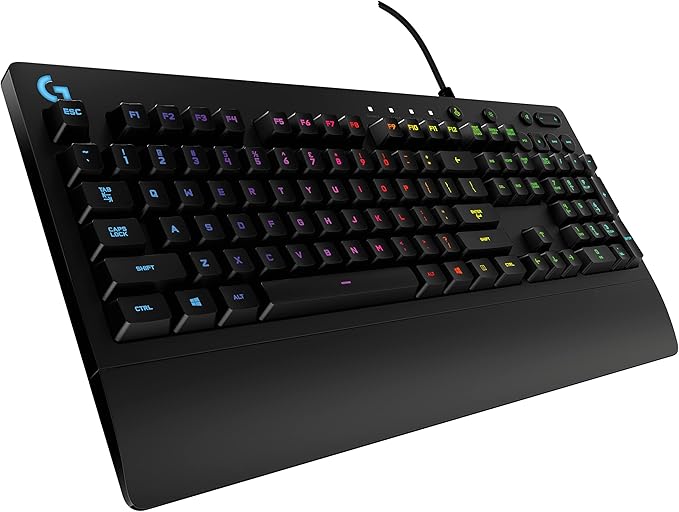
The Logitech G213 Prodigy is a budget-friendly, feature-packed membrane gaming keyboard designed for both casual and serious gamers. It offers RGB LIGHTSYNC backlighting, dedicated media controls, customizable function keys, and a spill-resistant design. With performance-tuned keys for tactile feedback and up to 4x faster response than standard keyboards, it balances productivity and immersive gameplay. It’s ideal for gamers who want quality and durability without breaking the bank.
| Pros: | Cons: |
| ✅ Tactile membrane keys ✅ Durable spill-resistant design ✅ LIGHTSYNC RGB lighting with 5 customizable zones ✅ Dedicated media controls ✅ Comfortable design | ❌ Keycaps are not easily replaceable ❌ Not mechanical |
Microsoft Comfort Curve 3000 – Best Ergonomic Keyboard

The Microsoft Comfort Curve 3000 is an excellent choice for those who value comfort and simplicity in their keyboard. Its unique curved design encourages a more natural hand and wrist position, reducing strain during prolonged use. The keys are responsive and quiet, making it ideal for work environments or late-night typing sessions. Though it may lack some of the advanced features of gaming-specific keyboards, its plug-and-play setup, reliable performance, and affordable price make it a standout choice for everyday use. If you’re someone who spends long hours typing and values comfort over flashy features, the Microsoft Comfort Curve 3000 is a keyboard you should definitely consider.
| Pros: | Cons: |
| ✅ Ergonomic design ✅ Quiet keystrokes ✅ Plug-and-play setup ✅ Durable build ✅ Affordable | ❌ No multimedia keys ❌ Wired, limiting mobility |
Corsair K55 RGB – Best Feature-Rich Keyboard
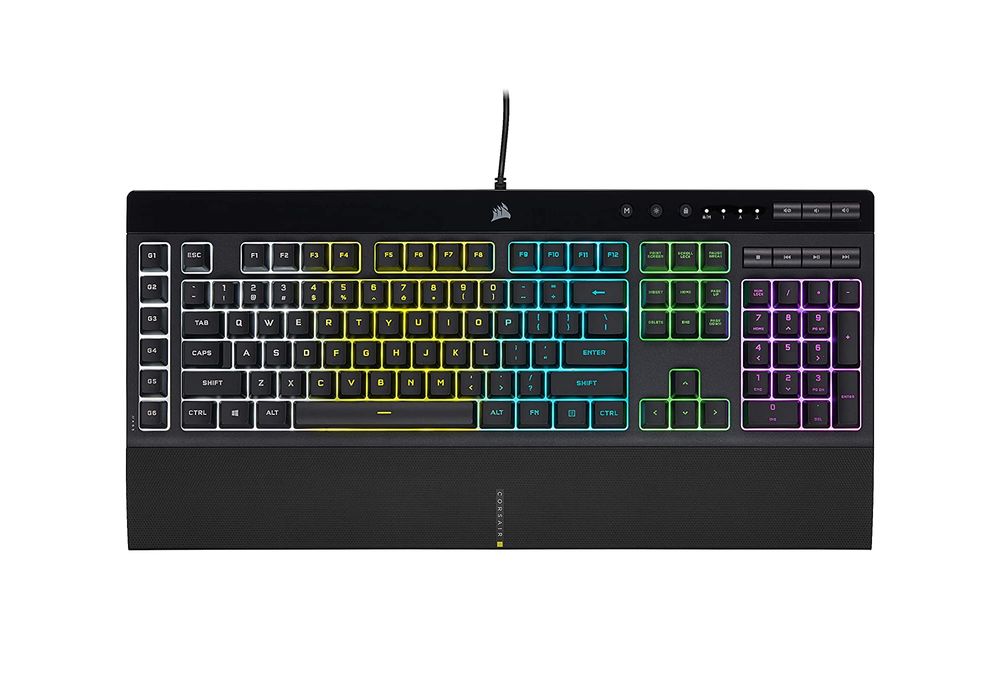
The Corsair K55 RGB Gaming Keyboard is a top pick for gamers looking for a feature-rich yet budget-friendly membrane keyboard. Its customizable RGB backlighting adds a fun and immersive element to your gaming sessions. The dedicated macro keys and multi-key anti-ghosting ensure that every command is registered and executed perfectly, providing you an edge in competitive gaming. The quiet and responsive keys coupled with the detachable soft rubber wrist rest ensure comfort during long gaming marathons. Although it may lack the tactile feedback of a mechanical keyboard, the K55 offers a lot of value, making it a solid choice for any gamer, especially those just starting their gaming journey.
| Pros: | Cons: |
| ✅ Dynamic RGB backlighting ✅ 6 dedicated macro keys ✅ Quiet and responsive keys ✅ Detachable soft rubber wrist rest ✅ Dedicated volume and multimedia controls | ❌ Bulky size ❌ Non-removable cable |
SteelSeries Apex 5 – Best Hybrid Gaming Keyboard
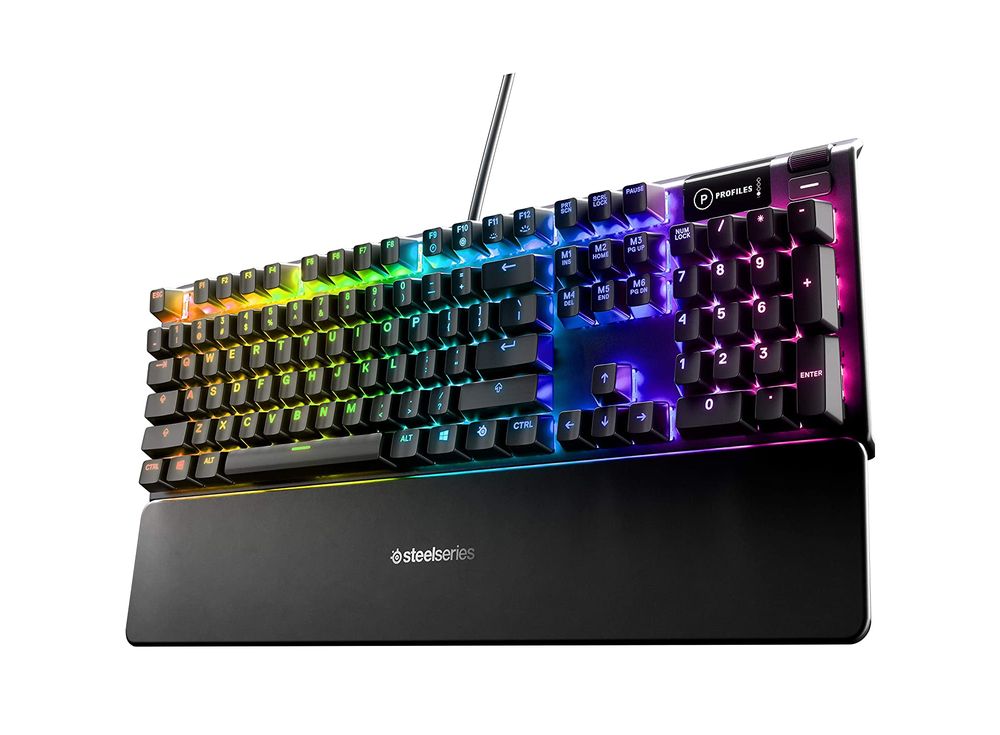
The SteelSeries Apex 5 is a fantastic choice for gamers who want the tactile feel of a mechanical keyboard without the accompanying noise. Its hybrid design gives you the best of both worlds, and the aircraft-grade aluminum frame ensures durability. The customizable RGB illumination is not only aesthetically pleasing but also helpful for gaming in low-light conditions. While it’s pricier than standard membrane keyboards, the blend of comfort, performance, and customizability it offers makes it worth the investment.
| Pros: | Cons: |
| ✅ Hybrid mechanical-membrane keys ✅ RGB illumination with millions of colors ✅ Aircraft-grade aluminum frame ✅ Programmable macros ✅ Detachable wrist rest | ❌ Pricier than pure membrane keyboards ❌ May be bulky for some desks |
What is a Membrane Keyboard?
A membrane keyboard uses pressure pads layered with a flexible membrane to register keystrokes, unlike mechanical keyboards that use individual switches. They are generally quieter, lighter, and more affordable, making them a popular choice for many users.
Buying Guide: What to Look for in a Membrane Keyboard
When shopping for a membrane keyboard, consider the following factors:
- Key Responsiveness: A good keyboard should register keystrokes easily and accurately.
- Durability: Look for spill-resistant designs and durable keys that can withstand heavy use.
- Comfort: Ergonomic designs or features like adjustable tilt can improve typing comfort.
- Extra Features: Multimedia keys, programmable macros, and backlighting can enhance your keyboard experience.
- Price: Membrane keyboards are generally affordable, but prices can vary based on features and brand.
Potential Issues with Membrane Keyboards
Despite their benefits, membrane keyboards can have a few potential issues:
- Key Fade: The lettering on the keys can fade over time.
- Key Sticking: Keys can sometimes stick, causing repeated characters.
- Reduced Tactile Feedback: Compared to mechanical keyboards, membrane models offer less tactile feedback.
Testing Your New Keyboard
Here are five tests you can do to evaluate your new keyboard’s quality:
- Key Responsiveness: Type quickly to see if all keystrokes are registered.
- Key Consistency: Make sure all keys require the same amount of force to press.
- Typing Noise: Check if the keyboard is as quiet as advertised.
- Spill Resistance: While we don’t recommend pouring liquids on your keyboard, it’s worth noting any manufacturer claims about spill resistance.
- Backlighting (if applicable): Test any backlighting or customizable lighting effects.
Choosing the Right Keyboard for Your Needs
Understanding your needs can help you choose the right keyboard:
- Gamers: Look for keyboards with programmable macros and customizable backlighting.
- Office Workers: Prioritize comfort, quiet keys, and durability.
- On-the-go Users: Consider a wireless or compact keyboard for portability.
Final Thoughts
Whether you’re gaming, working, or just browsing the web, a good keyboard can significantly enhance your experience. Our top pick for most users is the Logitech K120 for its balance of comfort, durability, and affordability. For gamers, the Razer Cynosa Chroma and Corsair K55 RGB offer a multitude of customizable features.
FAQs
How long do membrane keyboards last?
With regular use, a membrane keyboard can last several years. Durability largely depends on the quality of the keyboard and how it’s used.
Are membrane keyboards good for gaming?
While some gamers prefer the tactile feedback of mechanical keyboards, many membrane keyboards, like the Razer Cynosa Chroma, offer features tailored to gamers.
How do I clean a membrane keyboard?
Most membrane keyboards can be cleaned with a damp cloth. For a deep clean, you can remove the keys – just make sure to check the manufacturer’s instructions first.
Can a membrane keyboard be repaired?
Repairing a membrane keyboard can be difficult and it’s often more cost-effective to replace it.
Are wireless membrane keyboards as responsive as wired ones?
Yes, wireless keyboards can be just as responsive as wired ones, but make sure to check the keyboard’s latency specifications.
Absolutely held captive by your perspective, Owen! I resonate with your views and had a ‘Eureka’ moment when using this tool in my Mandarin tutors last week!❤️ Have you ever tried it with Spanish or any other languages? One aspect other readers may find interesting is how it also augments verbal communication, not just written language learning. On a side note, do you think it would be equally effective in learning sign language? Think it’d stir up an intriguing discussion. Until next time! 👍